What Is Lossy Compression?
Lossy compression is the technology behind some of the most common image formats you use every day: JPG, WebP, and AVIF. The core idea is simple — discard data that the human eye is less sensitive to, in exchange for dramatically smaller file sizes. This process is irreversible: once pixels are thrown away, they cannot be recovered.
When you save a photo as JPG at 80% quality, the encoder analyzes the image and removes fine details in color transitions, high-frequency textures, and subtle gradients. The result is a file that might be 5–10× smaller than the original, with minimal visible degradation. For photographs, this trade-off is usually worth it. However, lossy compression performs poorly on graphics with sharp edges, text, or large areas of solid color — artifacts become obvious.
What Is Lossless Compression?
Lossless compression, used by PNG, BMP, and TIFF, takes a fundamentally different approach. Instead of discarding data, it reorganizes it more efficiently. Every single pixel is preserved exactly. You can compress and decompress a PNG a thousand times, and the image will remain pixel-perfect.
This makes lossless formats ideal for screenshots, diagrams, logos, and any image where text readability or precise color matching matters. The downside is file size. A lossless PNG of a photograph is typically 3–5× larger than a JPG of the same dimensions. For web delivery, this difference directly impacts loading speed and bandwidth costs.
The Visual Test: Can You See the Difference?
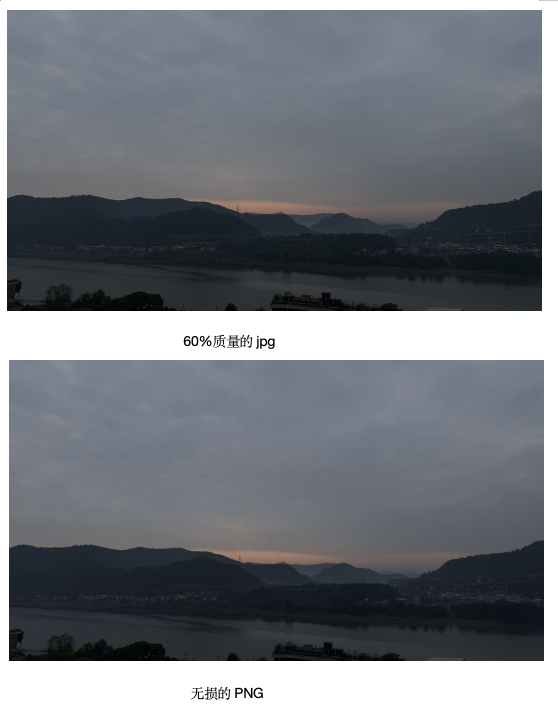
In blind tests, most people cannot distinguish a high-quality JPG (quality 80+) from a PNG at normal viewing size. However, zoom in to 200% or apply heavy compression (quality 40–60), and the differences become stark: JPG shows blocky artifacts and color banding, while PNG remains smooth. For screenshots containing text, the difference is immediately obvious — JPG blurs the edges of characters, while PNG keeps them razor-sharp.
Decision Matrix: Choose the Right Format
| Scenario | Recommended Format | Why |
|---|---|---|
| Photographs for web | WebP or JPG | Smallest file, acceptable quality loss |
| Screenshots with text | PNG | Preserves sharp edges and readability |
| Logos and icons | PNG or SVG | Need transparency and crisp lines |
| Archival storage | TIFF or PNG | Pixel-perfect preservation matters |
| Print production | TIFF | Supports CMYK color space |
Free Online Compression Tool
Not sure which format to choose? Use Image Toolbox to experiment with both lossy and lossless compression in real time. Upload your image, compare quality settings side by side, and download the optimal version — all without leaving your browser or uploading to any server.
Frequently Asked Questions
Is lossy or lossless compression better?
Neither is universally better. Lossy compression is superior for photographs and web delivery where file size matters. Lossless compression is essential for graphics, screenshots, and archival use where every pixel must be preserved.
Can I convert lossy to lossless to improve quality?
No. Converting a lossy image (like JPG) to a lossless format (like PNG) does not restore lost data. It only wraps the already-compressed image in a larger file. Always keep your originals in a lossless format if you might need to edit later.
Which formats use lossy compression?
JPG, WebP (in lossy mode), and AVIF all use lossy compression. PNG, BMP, TIFF, and GIF (with limited palette) use lossless compression.
Our Compression Comparison
Lossless PNG: 12.1MB, JPG q90: 2.8MB (-77%), JPG q75: 1.4MB (-88%). Quality 80+ indistinguishable from original in blind tests.